This article describes the process and the data used by OnAir to moderate Community Suggested Aircraft.
OnAir allows different variants of the aircraft it supports, as well as the addition of entirely new aircraft.
These differences may include, but are not limited to: fuel capacity, empty weight, max gross weight, and more.
Because OnAir uses data from add-ons rather than real aircraft specifications, some variants may not exist in real life, or they may differ significantly from their real-world counterparts.
¶ ✈️ Importing a New Aircraft or Variant
Before a new aircraft or variant can be added to OnAir, a few steps must be completed:
- A test flight must be made by the player in their simulator
- The OnAir Aircraft Moderation Team must check if the submitted data is coherent
When submitting a new aircraft or aircraft variant, the system will ask you to perform an in-simulator flight.
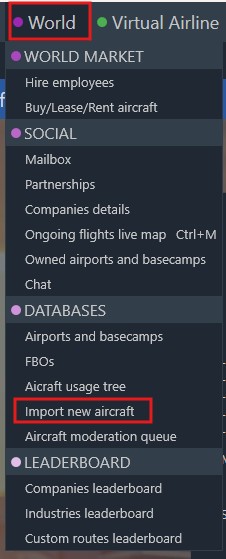
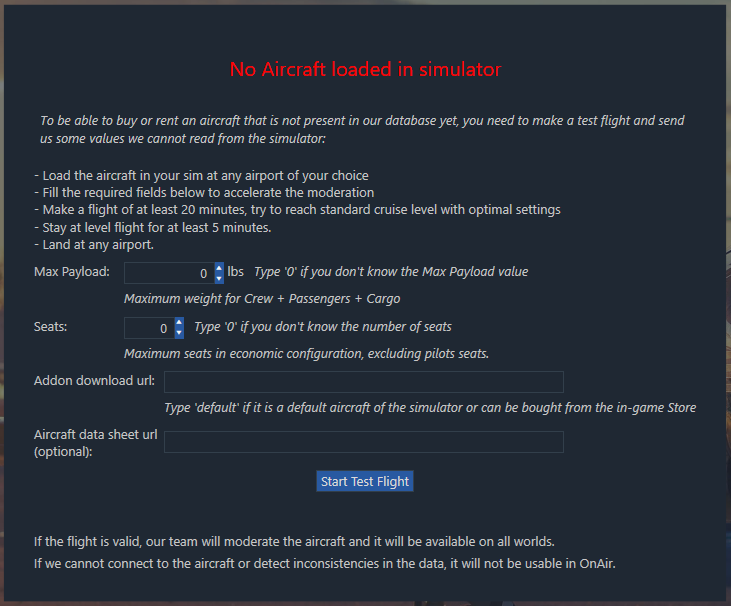
This test flight is required to gather data about the flight characteristics of the aircraft being submitted and to ensure that OnAir can communicate properly with the add-on.
You can view the flight’s recorded data (average Fuel Flow and Cruise Speed) by using View all players flights stats from the Aircraft Details page:
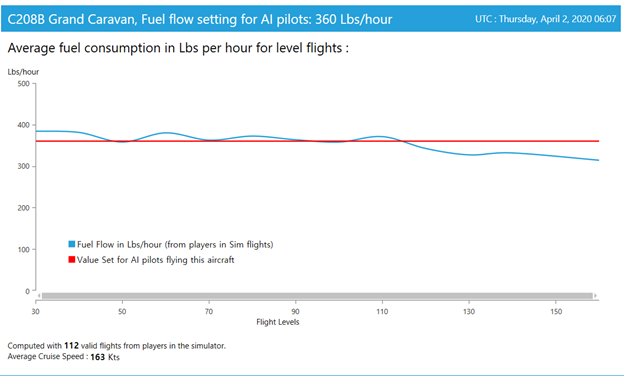
This data may differ significantly from real-world performance, depending on the add-on’s quality.
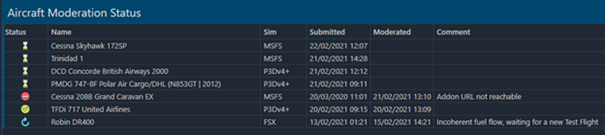
Once a valid Test Flight is registered, the aircraft appears in the list, accessible from World → Aircraft Moderation Queue.
¶ 🛈 Moderation Statuses
An aircraft can have one of the following four statuses:
| Icon | Description |
|---|---|
 |
The Test Flight has been made and the team will moderate it. |
 |
The aircraft has been moderated and accepted. It is ready to use in OnAir on all worlds. |
 |
The aircraft has been rejected. The reason is indicated in the Comment column. |
 |
The Test Flight was completed but contains incoherent data. Any user may redo the Test Flight. |
¶ 🔍 What Data Is Moderated?
The Aircraft Moderation Team verifies and adjusts the following data when necessary (especially if inaccurate or clearly attempted to cheat):
- Maximum Seats – maximum number of passenger seats in an economy configuration, initially estimated using a formula based on weight and fuel capacity
- Maximum Payload
- Needs a Copilot – by default, a copilot is required when the maximum gross weight exceeds 12,000 lbs, or when the maximum seating capacity is 14 or more
¶ 🛠️ Requesting Changes to Existing Aircraft
Once an aircraft is available in OnAir, any player may submit a change request by opening a ticket on our support platform: