Now that your first aircraft is rented and ready, it’s time to find a job to fly!
If you used the “Teleport my pilot” option when renting your plane, a return job to your starting airport has already been generated automatically. You can go to Prepare Your First Flight
Otherwise, follow the steps below to choose your first assignment manually.
¶ 🛫 Step 1 - Access the Aircraft Screen
If you’ve just finished renting your plane, you should already be on the My Aircraft screen.
If not, go to My Company → My Aircraft (or press Alt + A).
¶ 🔍 Step 2 - Open the Job Search Tool
Next to your aircraft, click the Job Search button.

This opens the Global Logistics Center with your aircraft’s airport automatically pre-selected. You’ll now see a list of jobs filtered to match your aircraft’s type and capacity.
For your first job, limit the range to about 50 NM or less, so you can complete it quickly and safely. You can expand this later as you gain experience. Large airliner jobs usually appear at much longer distances — often 1000 NM or more.
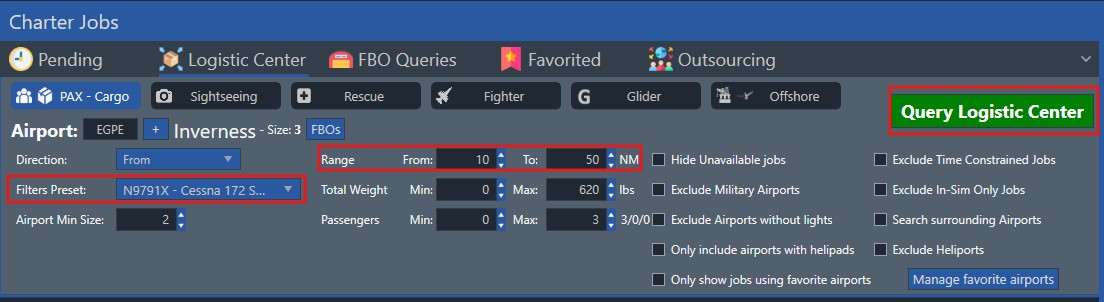
After adjusting the range, click Query Logistic Center again to refresh the job list.
¶ 📦 Step 3 - Choose the Right Job
Take a moment to review the list of available jobs.
- ✅ A blue check mark means you meet all requirements for that job.
- ℹ️ A blue info icon means you’re missing a qualification or skill.
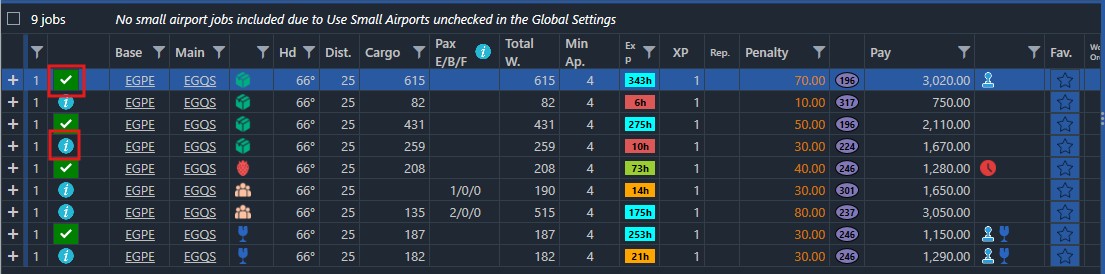
Tips for your first flight
- Job Legs: Prefer a job with only 1 leg — it’s simpler for a first run.
- Job Type: Choose a basic cargo job:

- Avoid for now:

(See the “Finding Jobs” page for details on all job types.) - Tycoon Mode: If you’re playing in Tycoon (AI-only) mode, tick Exclude Human Only Jobs in the filter panel to hide jobs that require manual flight:

¶ ✈️ Step 4 - Take the Job
Once you’ve found a suitable job, click Take.
The job is added to your Pending Jobs list and is ready to be loaded onto your aircraft.
¶ 🎬 Watch the overview

👉 Continue to the next step:
Prepare Your First Flight →