After choosing your world (Cumulus, Stratus, or Thunder), it’s time to create your company.
Click the Start my Company button under your selected world to open the setup screen.
¶ 🧭 Company Setup Screen
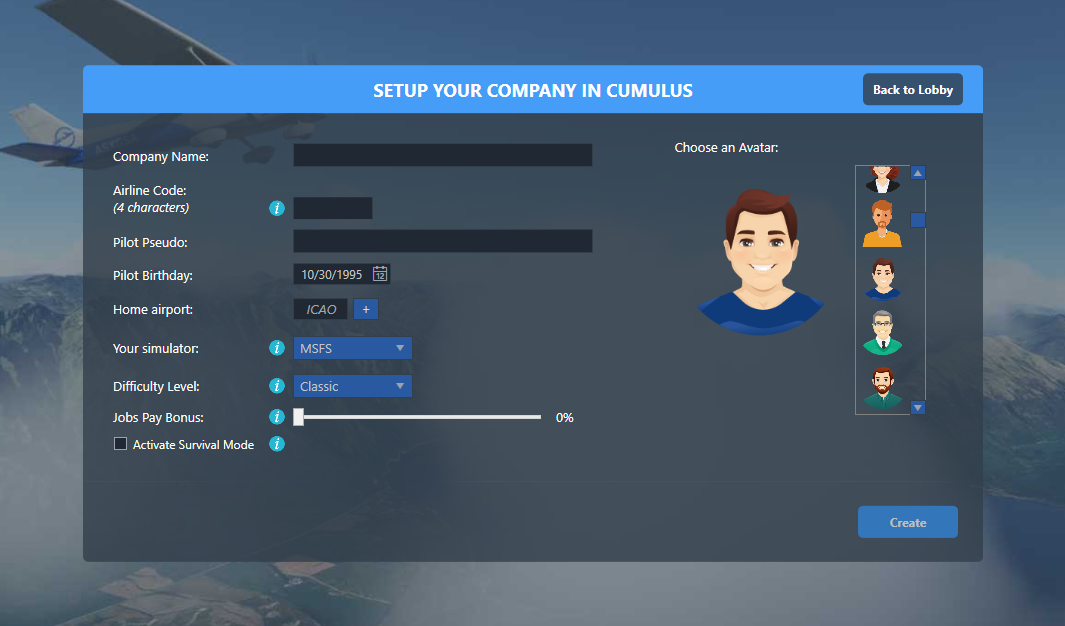
You’ll see the Setup your company window, where you can customize your CEO, company identity, base location, and simulator preferences.
¶ 🏢 Company Name
Enter the full name of your company, this will be displayed across OnAir and represent your airline publicly.
💡 Example: “SkyLink Airways”, “AeroConnect”, “FlyOnAir”
¶ ✈️ Airline Code (4 characters)
A short identifier (letters or numbers) used throughout the game, similar to an ICAO airline code.
💡 Example: OAIR, SKY1, or FLYC.
¶ 👨✈️ Pilot Pseudo
This is the name of your main character, your CEO and pilot within the OnAir world.
You can use your real name or a fictional one.
¶ 🎂 Pilot Birthday
Choose any date, this field is purely for character biography and has no gameplay impact.
¶ 📍 Home Airport
Enter the ICAO code of the airport where you want to start your company.
When valid, OnAir will show the full name and size of the airport.
💡 If you don’t know the code, click the ➕ icon to search by airport name.
¶ 🕹️ Your Simulator & Tycoon Mode
Select the flight simulator you’ll use with OnAir (MSFS, X-Plane, P3D, or FSX).
You can change this later from the Options → Preferences menu.
You also have the option to choose Tycoon Mode.
This mode is designed for players who want to run their company entirely through AI pilots, without connecting to a flight simulator.
💡 Choose Tycoon Mode only if you never plan to perform flights manually in your simulator.
⚠️ Important notes:
- Tycoon Mode is not available on Thunder world.
- Once your company is created, this setting cannot be changed without starting a new company.
🎯 In Tycoon Mode, all flights are handled by your hired AI pilots, letting you focus purely on business and management decisions.
¶ 🎭 Choose an Avatar
Pick the avatar that best represents your CEO.
Scroll through the available characters on the right to choose your look.
¶ 🌤️ Additional Settings (Cumulus World Only)
If you’re creating your company in the Cumulus world, you’ll see three extra options:
¶ 💰 Difficulty Level
Adjusts your starting cash and the bank loan conditions.
- Easy: More funds, higher job income, forgiving loans.
- Hard: Less starting capital, stricter economy, slower progression.
¶ 💵 Job Pay Bonus
A multiplier that increases your job rewards by up to +90%.
It only affects your company, not the global economy.
💡 Useful if you want a faster start or a more relaxed experience.
¶ ☠️ Activate Survival Mode
When checked, all optional helper rules are disabled.
This makes your experience closer to the Stratus and Thunder worlds — no teleportation, no bonus aids.
⚠️ You can disable Survival Mode later in Cumulus
¶ 🚀 Final Step
Once all fields are filled, click the Create button at the bottom of the screen.
Your company will be generated and your CEO will appear at the selected home airport, ready to begin operations.
¶ 🎬 Watch the tutorial video

🎥 This video walks you through the entire company creation process step by step.