The Logistics Center is where you find and manage all available jobs in OnAir — including Passenger, Cargo, Rescue, Sightseeing, and Fighter missions.
This section explains how to search, filter, and manage your jobs efficiently.
¶ 🧭 Finding Jobs
You can access the Global Logistics Market via:
- The main menu:
World → Find Jobs - The shortcut key: Alt + J
- Or the quick-access icon at the top of the screen
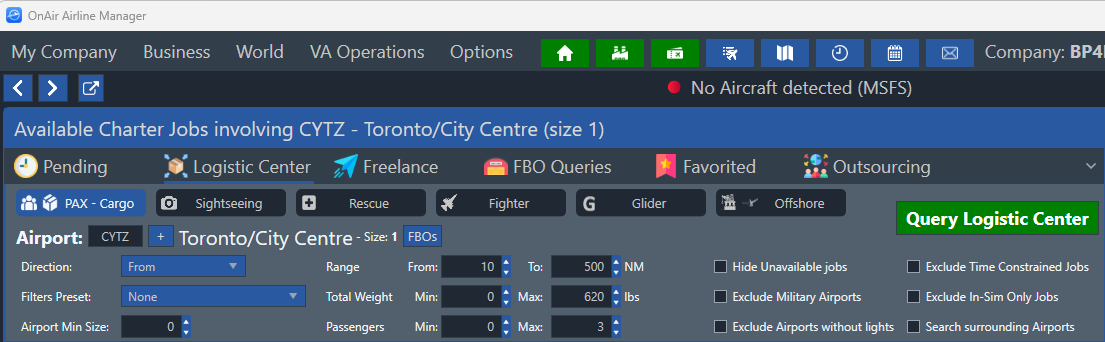
At the top of the screen, you’ll find 5 categories of jobs to browse:
- ✈️ PAX / Cargo
- 🗺️ Sightseeing
- 🚁 Rescue
- 💥 Fighter
- 🧩 Glider
You can also use Filter Presets to automatically set parameters for your active aircraft.
¶ ⚙️ Search Options
When searching under PAX/Cargo, you can refine your results using the following filters:
- Airport — Enter an ICAO code or click “+” to open the airport search dialog.
- Direction — Choose between:
- From → jobs departing your airport
- To → jobs arriving at your airport
- Specific Airport → search both origin and destination
- Range — Minimum and maximum distance (NM).
- Total Weight / Passenger Count — Define min and max payload values.
- Airport Min Size — Filter airports by runway length and size:
- 0–1: very small or bush strips
- 2: small regional fields
- 3: regional airports
- 4: international (medium)
- 5: major international airports
- Search Surrounding Airports — Include nearby airports in your search.
- Hide Unavailable Jobs — Exclude jobs locked by skills you don’t have yet.
- Exclude Time-Constrained Jobs — Ignore those with strict start times.
- Exclude Military Airports — Removes known military fields.
- Exclude Airports Without Lights — Filters out airfields unsuitable for night ops.
Once your options are set, click “Query Logistics Center” (top right) to refresh your results.
¶ 🧩 Understanding Job Results
Each column in the job list provides key data for decision-making:

| Column | Description |
|---|---|
| 1 | Expand job details |
| 2 | Number of legs in a job |
| 3 | Take button / info tooltip |
| Base | Departure airport |
| Main | Destination airport |
| Icon | Job type (see Charter Job Types) |
| Hdg | Heading (°) between origin and destination |
| Dist | Distance (NM) |
| Cargo | Payload weight (lbs) |
| Pax E/B/F | Passenger count by class (Economy/Business/First) |
| Total W | Total payload weight (lbs) |
| Min Ap | Minimum required airport size |
| Exp | Job expiry color indicator |
| XP | XP reward on completion |
| Bonus Rep | Reputation gain |
| Penalty | Financial loss on failure/expiry |
| Pay | Total payment for the job |
| Fav | Add to favorites ⭐ |
| Profit/NM | Profit per nautical mile |
💡 Hover over most values for additional information.
¶ 🔽 Sorting & Filtering Results
Sorting jobs is simple:
- Click a column header to sort ascending (↑) or descending (↓)
- Click again to remove the sorting order
To filter, click the funnel icon 🔽 next to a column title.
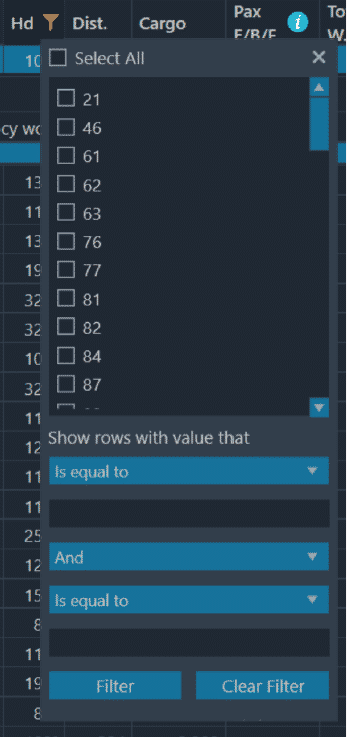
You can:
- Check/uncheck specific values
- Apply two filter rules using logical operators:
| Rule | Description |
|---|---|
| Is Equal To | Matches the exact value |
| Is Not Equal To | Excludes the value |
| Is Less Than | Below a certain number |
| Is Greater Than | Above a certain number |
| Is Greater / Less Than or Equal To | Includes equal values too |
You can combine rules using AND (both must match) or OR (one must match).
¶ 📦 Managing Your Jobs
Once you’ve taken a job, it appears in your Pending Jobs List.
Access it with Alt + P, via the top menu, or through the “Pending” tab.

Here you can:
- View job details, origin, and destination
- Track progress or abandon jobs if necessary
- Use the ⭐ button to favorite jobs for later planning
⚠️ You cannot abandon a job while cargo or passengers are loaded.
Cancelling late may trigger financial and reputation penalties.
A short grace period exists after taking a job — useful for misclicks.
¶ ⭐ Favoriting Jobs
Favoriting lets you bookmark interesting jobs without taking them.
They remain visible under the Favorites tab, and you can plan routes or compare payouts before deciding.